To search
You are here: > > > > VoodooPad
Softonic Rating:
Excellent:9/10
License:
Evaluation
Added:
December 20, 2005
Updated:
February 11, 2008
Publisher:
Website
File size:
5.9 MB
Downloads:
97
Cyril Roger

“A new kind of notepad”

by Cyril Roger

VoodooPad is probably the ultimate notepad.

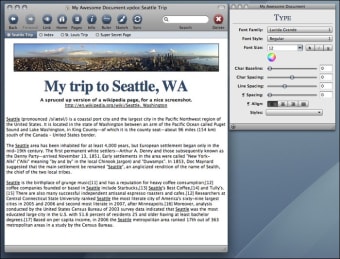
A first look at the interface might make you think that VoodooPad is more difficult to use than it actually is. Yet the application is incredibly intutive and is great to jot down any sort of notes and sort them by categories and pages. You can sketch up drawings, which you'll associate to your notes and add links, bookmarks or even images, video, audio files and applications.

The best thing about VoodooPad is probably how you can link up elements though. You can literally create your own network, into which each elements have their own place and logic. This means that you can really organize notes according to your own way of thinking. VoodooPad also includes a search box at the top right and lets you open up elements in a tabbed view.

I'd recommend using VoodooPad simply because you can more or less mold notes the way you want and also because it's easy to add anything to it. It feels more powerful than a basic notepad yet it is very intuitive and flexible to work with.

VoodooPad lets you jot down and keep any sorts of notes, sketches and files in one place, which you can then organize into your own sort of mini web. A must.

Languages:

English

Recent changes in VoodooPad:

  • Double clicking an image open it up in a suitable external editor (such as Acorn or Preview or Photoshop or whatever). Saving the image will then update the original image located in your VoodooPad Page. You've seen Acorn, right? http://flyingmeat.com/acorn/
  • You can now edit pages and sort the results in the search window (woo!).
  • Option-clicking on a tab close button will close all the open tabs except the one clicked on.
  • The "default page text" in the preferences now accepts rich text, so you can embolden certain phrases or whatever. Go crazy.
  • Pages served up via VoodooPad Pro's built in webserver look a whole lot better, especially on the iPhone.
  • Speaking of the webserver- you now have the ability to search through all the pages when looking at a document in your browser (VoodooPad Pro only).
  • The zoom factor of the page is remembered in the document workspace, so it'll be remembered between launches.
  • When splitting a document, links to pages in the original document are retained for the pages being copied out.
  • Added a page index to the default Web Export templates. Now you have a handy list of all the pages in your Web Export.
  • New AppleScript: tell window 1 of application "VoodooPad" to insert text "hello world!"
  • New AppleScript command to add/embed a file to the current document.
  • Added an option to VoodooPad AppleScript export command- "with synchronous", which makes the export happen in the foreground.

OS requirements for VoodooPad:

  • OS: Mac OS X

Minimum requirements:

  • Processor: PPC/Intel MHz
  • Mac OS X 10.4.6 or later
Pros
  • Very intuitive
  • Create your mini web
  • Sketch, note and link up
Cons
  • Looks more complex than it actually is
Did you like this review?
3 of 6 users liked it (50%)

VoodooPad Softonic Rating: 9Featured program

Softonic gives special recognition to software of exceptionally high quality. More information

From the publisher of VoodooPad

VoodooPad is a new kind of notepad. It's like having your own digital junk drawer where you can jot down notes, web addresses, to-do lists... Anything on your mind. VoodooPad automatically links each page together, to form a miniature world wide web, on your desktop! Anybody familiar with the WikiWikiWeb will feel right at home with VoodooPad. Type in your notes, and highlight important words or phrases to create new pages; or drag and drop folders, images, applications, or URLs into VoodooPad - they're linked up whenever the word representing it is found.

VoodooPad offers the following features:

Category / Tag support

Assign and browse categories to pages in your documents

Spotlight

Search the contents of your VoodooPad documents via Spotlight

Inter-document links

Link to a specific page in another VoodooPad document

Sketch

Feeling artistic? Bring down the Sketch sheet and draw what you can't express in words

Auto-Bullets

Make lists and outlines with a couple of key commands

Saved Workspaces

Quit with all your windows open. Relaunch, and there they are again

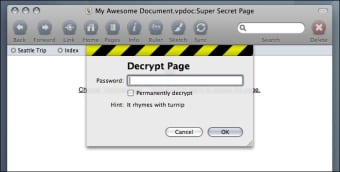
Encryption

Securely encrypt pages in your document

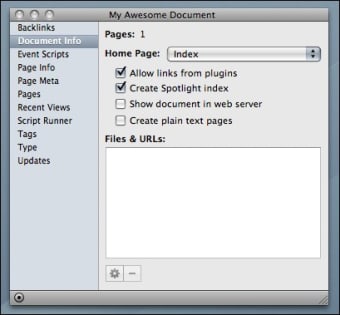
Backlinks

Find out what pages link to the current page

New Search

Search through multiple open documents at one time

Improved AppleScript support

Change the contents of any page from AppleScript

AddressBook Integration

The names of people in your AddressBook become links you can act on

Rename pages

If you don't like the title you gave to a page, rename it

Improved URL and email address markup

Figure out what exactly is an url or not

Threaded exporting

Put tasks in the background so you can keep on working in your pages

VoodooPad options

VoodooPad Options

Reviews for VoodooPad in other languages

Softonic Rating:Excellent
User Rating
Your opinion is important!

Download stats

Are you the developer of VoodooPad?

If your program has received a Softonic rating, feel free to use the following award badge on your site or as part of any other promotional feature you may be putting together.

VoodooPad Softonic Rating

Click on the above text field to copy the necessary HTML to your clipboard and then paste it to your website. It will display your program's Softonic Rating and will link to your program page.

Any queries? Contact us if you want more info.

Close